Other
Jun 18 7:52 pm
Many of you have been contacting me about reliably getting updates on facebook, and until now there hasn’t been a great way to make it happen. Now you can change a few quick settings so all of the Free Stuff Times posts show up in your news feed every day!
- First, like Free Stuff Times on Facebook. You can also follow these same instructions for the Contests, Coupons, and Screenings facebook pages!
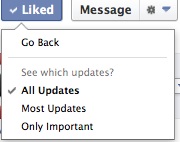
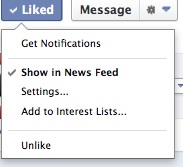
- Then, hover over the “liked” button, and make sure the “show in news feed” option is checked. You can also click the “get notifications” option here if you want a notification on facebook every time there is a new Free Stuff Times post.
- Then click the settings option, and select the “All Updates” option, and you’re all set!